Signal blocks screenshots to stop AI agents from reading your private chats
Signal now blocks screenshots by default on iOS 27 and Android so Siri AI and Google Gemini cannot read and store your private messages.
Signal, the world's best-known encrypted messaging app, just raised a new wall. On Friday, November 20, 2026, Signal president Meredith Whittaker announced on the official blog that the app now blocks screenshots by default, to stop AI agents built into phone operating systems from reading and storing private messages. Signal calls the protection incomplete, but it sends a clear message to Apple, Google and Microsoft.
1. What changes on iPhone and Android
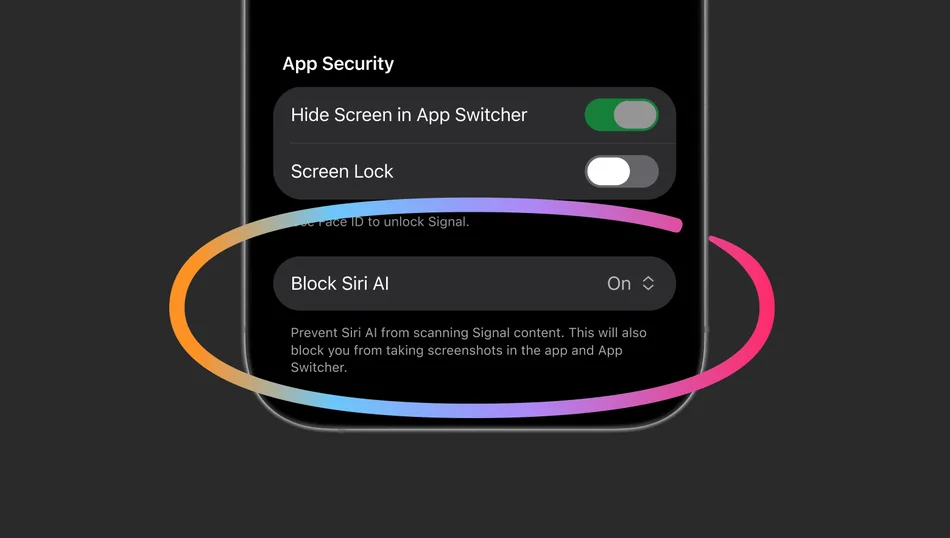
On iPhones running iOS 27, Signal now blocks screenshots and App Switcher screen previews by default. The new setting is called "Block Siri AI". If you try to take a screenshot anyway, Signal shows the message "Screenshot prevented by 'Block Siri AI' setting". You can switch the protection off in the app's privacy settings, but Signal warns that doing so can expose your messages to AI agents.
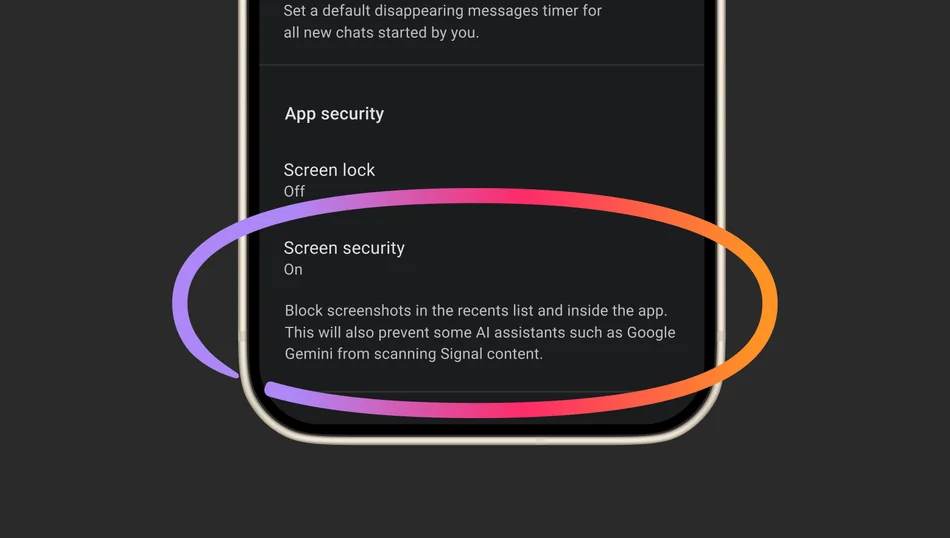
On Android, Signal automatically turns on its existing Screen Security feature when it detects an AI assistant trying to read your screen. The feature blocks screenshots inside the app and in the recents list, and stops assistants such as Google Gemini from scanning Signal content. Signal admits this protection does not work on every Android device, because it depends on detecting AI agents on specific Android versions.
2. Why AI agents became a big problem
AI agents like Siri AI (Apple) and Gemini Intelligence (Google) are now built directly into phone operating systems. To answer questions and complete tasks for you, they scan what is on your screen, including messages inside other apps.
The problem is that once the data is captured, it is out of Signal's control. In the blog post, Whittaker wrote that your sensitive data is "stored and made accessible to whatever local database or remote server an OS-level AI agent is using at that moment", all of it outside Signal's reach. Signal calls this situation an existential threat to the company and its privacy mission, because end-to-end encryption stops mattering once a message is read off the screen after decryption.
3. This is not the first time Signal has acted
The move repeats what Signal did on Windows last year. Back then, Signal blocked screenshots by default to stop Microsoft's Recall feature from capturing and storing Signal message screens on Windows 11.
This time the scope is wider: iOS 27 and Android. But one platform still leaks. Signal admits it currently has no reliable way to block screenshots on macOS, so Mac users remain exposed to the AI agents built into that system.
4. The limits of this protection and the push on OS makers
Signal itself admits the fix is incomplete. Blocking screenshots does not close other paths, such as filesystem access to files already stored on the device, or access through notifications.
That is why Signal is urging Apple, Google and Microsoft to give app developers a clear, purpose-built way to stop AI agents from reaching app data, whether through screen reading, the filesystem or notifications. According to Signal, Apple currently offers no finer controls to iOS developers, so blocking screenshots is the best workaround available.
What it means for you
The restrictions are already on by default for most iPhone users and some Android users, so there is nothing you need to do to enable them. What you should know is how it changes your app's behavior:
- Screenshot failing? If you see "Screenshot prevented by 'Block Siri AI' setting", the protection is working, it is not a bug.
- Need screenshots? Re-enable them in Signal's privacy settings, but remember this can expose your messages and your contacts' messages to AI agents on your phone.
- Android users: Check the Privacy section in Signal and make sure Screen Security is on, because it is not on by default on every device.
- Mac users: There is no equivalent protection for now, so be careful with the AI agents you enable on macOS.
- Sensitive messages: Avoid sending personal information through any app if your phone runs an AI agent that continuously reads the screen.
Related reading: Meta's AI agent was previously reported reading an employee's Signal messages, one example of the risk Signal is trying to block, covered in our Meta Muse and Signal privacy story.