
OpenAI dots can now be called straight from Apple CarPlay
OpenAI let users call their dot from the CarPlay screen starting 21 November 2026, so your personal AI agent now rides along without you touching the phone.
Voice chats with ChatGPT in the car are nothing new, but you can now call your dot, OpenAI's personal AI agent, straight from the CarPlay dashboard. Romain Huet of OpenAI shared a demo on X on 21 November 2026, and Greg Brockman reshared the announcement.
1. What was announced
A dot is an always-on AI agent inside ChatGPT. Until now you could message or call your dot in ChatGPT, on Slack and on Teams. From 21 November, CarPlay joins that list: tap the phone button on your car screen and a voice call with your dot starts right there.
For the uninitiated, a dot is more than a voice chatbot. It takes on tasks, makes small decisions on its own, and reports back when you are ready. Calling it from the car means that work can be directed mid-drive without touching the phone at all.
2. What the demo showed
In the demo video, Huet sits in a car and starts a call from the CarPlay screen. The screen shows the dot's blue cartoon face with a red end-call button and a mute button beneath it.
He tells his dot he is driving home and just remembered a talk tomorrow. The dot pulls up the invite: he is on at 11:30 tomorrow, speaking to early-stage founders from the latest Growth cohort. When he asks what they would like to hear, it suggests a talk about what is newly buildable at the frontier, with a couple of concrete examples.
Then the dot raises something he had not asked about: the GPT-Live-1.1 voice model has shipped in the API, but one demo and a few developer docs still use the old model. Huet asks it to open a pull request and tag him and a colleague. The dot commits to switching the demo to GPT-Live-1.1, testing it, updating the docs, and bundling everything into one draft pull request for review.
3. What you need to try it in the car
No special hardware required. OpenAI's official checklist for ChatGPT in CarPlay: an iPhone that runs iOS 26.4 or later, the latest ChatGPT app, and a car that supports CarPlay. ChatGPT in CarPlay is already available globally on all plans.
Three things to know before you try. First, CarPlay is voice-first by design, so long answers are not displayed as text on the screen. Second, Apple does not allow wake words, so you start the call from the ChatGPT icon on the CarPlay screen rather than a magic phrase. Third, your dot cannot control car functions or other apps like Maps and Mail.
A practical tip: inside the ChatGPT app on your iPhone, open Settings, go to Voice, and enable Start automatically in CarPlay so that every time you open ChatGPT in the car it jumps straight into voice mode.
4. What a dot is, and who can use one
Dots launched officially on 29 September 2026. Each dot has its own cloud computer, its own browser, and access to the apps you connect. It runs on the GPT-6 family of models, and since 3 November it can also draw on GPT-6.1 Terra for parts of its work.
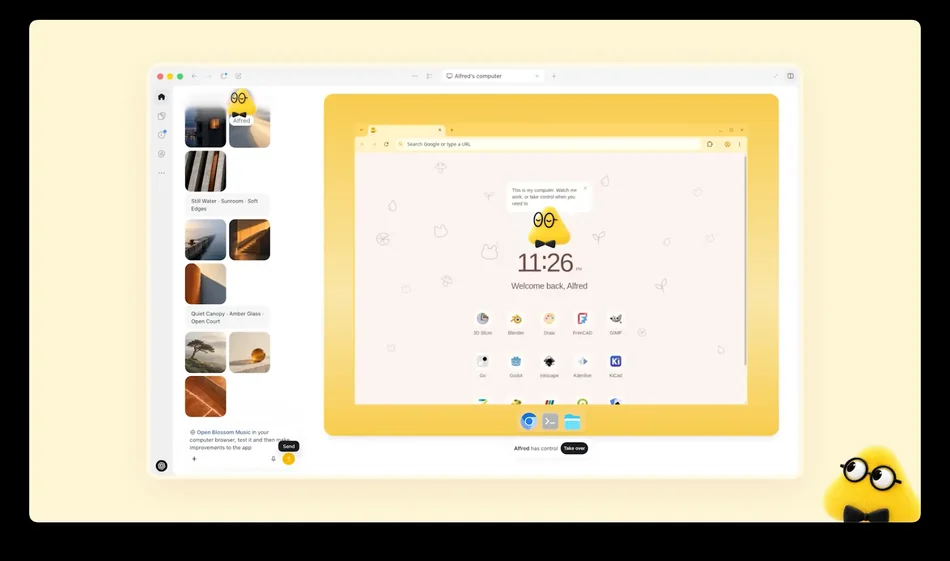
When called, your dot speaks with the GPT-Live-1.1 voice model. OpenAI's system card lists GPT-Live-1.1 and GPT-Live-1.1 Quip as the latest voice models for ChatGPT, Codex and dots, and the API version went live on 19 November 2026.
Who can use one: Pro users and selected Plus users aged 18 and older, outside the European Economic Area, Switzerland and the UK. Business Premium members in supported regions get access too. For Enterprise, Edu and Healthcare workspaces, dots became available by default on 18 November 2026 unless an admin opts out.
5. Four ways to reach your dot, and the limits
With CarPlay in the mix, there are now four ways to start a voice call with your dot. In the ChatGPT app, tap the phone button in your dot's conversation. On iPhone, the Your dot widget can carry a call button. The Shortcuts app has an Open your dot action with a Call mode, well suited to the iPhone Action button. And now, the CarPlay screen.
The main limit is unchanged: your dot cannot call you first. Every call starts on your side, and OpenAI says calls initiated by the dot are planned for after launch.
For comparison, ChatGPT Voice has been on CarPlay since 31 March 2026, but talking directly to your dot from the car only started on 21 November.
What it means for you
If you already use a dot for daily work, it now follows you onto the road. Here is what to do:
- Check your eligibility. Dots are available to Pro, selected Plus and Business Premium users outside the EEA, UK and Switzerland.
- Update your phone. Make sure you run iOS 26.4 or later and the latest ChatGPT app, then look for the ChatGPT icon on your CarPlay screen.
- Use drive time for light work. The OpenAI demo shows realistic use: check a schedule, get talking points, direct developer work. Heavy work is still easier at a desk.
- Mind the limits. Your dot cannot call you first, and calls in the car still demand focus on driving. Park before you review results on the screen.
- Compare with other agents. Apple has also been bringing AI agents to the Mac, which we covered in our Apple agent report. Full options live on our AI Tools page.
Sources
- Report on calling your dot from CarPlay (Sulat)
- Introducing dots (OpenAI)
- Getting started with your dot (OpenAI Help Center)
- Message your dot: channels (ChatGPT Learn)
- Using ChatGPT in CarPlay (OpenAI Help Center)
- GPT-Live-1.1 system card (OpenAI)
- OpenAI brings ChatGPT to CarPlay for hands-free voice conversations (MacRumors)